“How do I put AI on my business website?”
Four ways to put AI on your website. One isn’t a chatbot.
You can put AI on a business website in four ways: a chatbot widget, AI site search, something you build yourself, or your business’s own AI that answers with pages, which is what a Brief is. Expect to pay from nothing to about $700 a month, and most tools charge by use. This guide compares all four, with each vendor’s current price.
By Ethan Buzza, co-founder of Ringlio
01The four routes, side by side
| Route | What your customer sees | What it knows | How you pay | What you get back |
|---|---|---|---|---|
| Chatbot widget | A bubble in the corner that opens a thread of messages | The help articles and pages you load into it | By use: per resolution, conversation or message, often plus seats | Chat transcripts |
| AI site search | A written answer beside the search results | The pages your search tool has indexed | An annual licence | Search analytics |
| Build your own | Whatever you design | Whatever your developer connects | AI usage, plus the developer’s time | Whatever you build |
| Your own AI, answering with pages (Briefs) | A designed page for each question, in your brand, with your photographs and widgets | What your business knows, including what your website never said | A flat monthly fee | Every question asked, the gaps in your website, and pages AI search can read |
In a sentence each. A chatbot widget puts a chat thread on your site and charges by use. AI site search adds a written answer to your search results and suits sites with hundreds of pages. Building your own gives you control and leaves you the upkeep. A Brief gives your business its own AI, which answers each customer with a page in your brand for a flat fee.
Which is best for a small business?
- You already run a helpdesk: add the AI agent your helpdesk sells, such as Intercom Fin or Zendesk’s.
- You want something free to set up yourself: Tidio’s free plan or HubSpot’s free chatbot builder.
- Your customers ask before they buy, book or enrol, and how it looks matters: a Brief.
02Route one: a chatbot widget
The most common route. You sign up, point the tool at your website or help articles, and paste a snippet of code into your site. Visitors get a chat bubble that opens a conversation.
The chatbot knows what you load into it, and most charge by use, so the bill moves with your traffic. Prices below are each vendor’s own, read from its pricing page on 10 November 2026.
- Intercom Fin
Intercom Fin costs US$0.99 for each conversation it resolves. On another helpdesk, Fin has a 50-resolution monthly minimum; on Intercom’s own helpdesk, seats are extra. Fin has a 14-day free trial.
- Tidio (Lyro)
Tidio has a free plan with 50 conversations a month. Its Lyro AI agent starts at about US$32.50 a month for 50 AI conversations, then rises in tiers.
- Chatbase
Chatbase starts at $40 a month for 700 message credits, billed monthly ($32 billed yearly). Extra credits are $40 per 1,000, and removing Chatbase’s branding is $99 a month.
- Zendesk
Zendesk includes AI agents in its Support and Suite plans (seats from US$19 an agent each month, billed annually). A few automated resolutions are included; more are US$2.00 each on pay-as-you-go.
- HubSpot
HubSpot’s free chatbot builder follows if-then flows you write. HubSpot’s AI Customer Agent is US$0.50 for each resolved conversation and needs a Professional or Enterprise edition.
Whichever you choose, try it on your hardest questions before it goes live. The Ringlio Website Chatbot Test 2026 found that 62% of 71 website chatbots gave at least one wrong answer on a point that changes a buying decision, when asked hard pre-purchase questions. The test names no product.
Where a pricing page showed “$” without a currency code, we have written it the same way.
03Route two: AI site search
Your site’s search box, with a written answer above or beside the list of results. The answer is drawn from the pages the search tool has indexed, and it cites them.
AI site search suits sites with hundreds of pages, such as universities, councils and large catalogues, where visitors already search. It is an enterprise purchase: AddSearch lists AI Answers at $700 a month, billed annually, and says custom set-ups take two to four weeks with its specialist. Algolia publishes search pricing by request volume but no public price for its AI answers.
04Route three: build your own
If you have a developer, you can connect your site to an AI company’s model directly. You control everything, and you maintain everything.
Can I embed a custom GPT on my website?
No. A custom GPT made inside ChatGPT can’t be embedded on your website; it only works inside ChatGPT. To put OpenAI’s models on your own site you use its API or ChatKit, an embeddable chat that needs your own server behind it.
What about a business agent inside ChatGPT?
That isn’t on your website either. In November 2026 OpenAI began letting a business publish an agent that answers customers inside ChatGPT, reached from the business’s profile there. For now it is open to eligible ecommerce and online service businesses in the United States. It explains products and policies and links to your website; it can’t take a booking or a purchase.
It reaches people who are already asking ChatGPT. The four routes in this guide are for the people already on your website. Read from OpenAI’s pages on 11 November 2026, while the feature is in beta.
What it costs you later
The tools change under you. OpenAI set 30 November 2026 as the shutdown date for its Agent Builder. Whatever you build, someone has to keep it working, keep its knowledge accurate and watch what it tells your customers.
Some website builders include a version of this. Wix’s Smart Chat has an AI mode that answers from your site’s content.
05Route four: your own AI, answering with pages
A Brief is your business’s own AI, on your own website: it knows what your business knows, and answers every customer with a page in your brand.
A customer asks anything. The answer arrives as a page: a headline, a few sentences, one of your photographs and, where it helps, a widget such as a price guide, a timeline or the steps to book. Each new answer joins the page, and the serious questions turn into calls: a visitor who wants a person leaves their details, and they reach you with everything that visitor read.
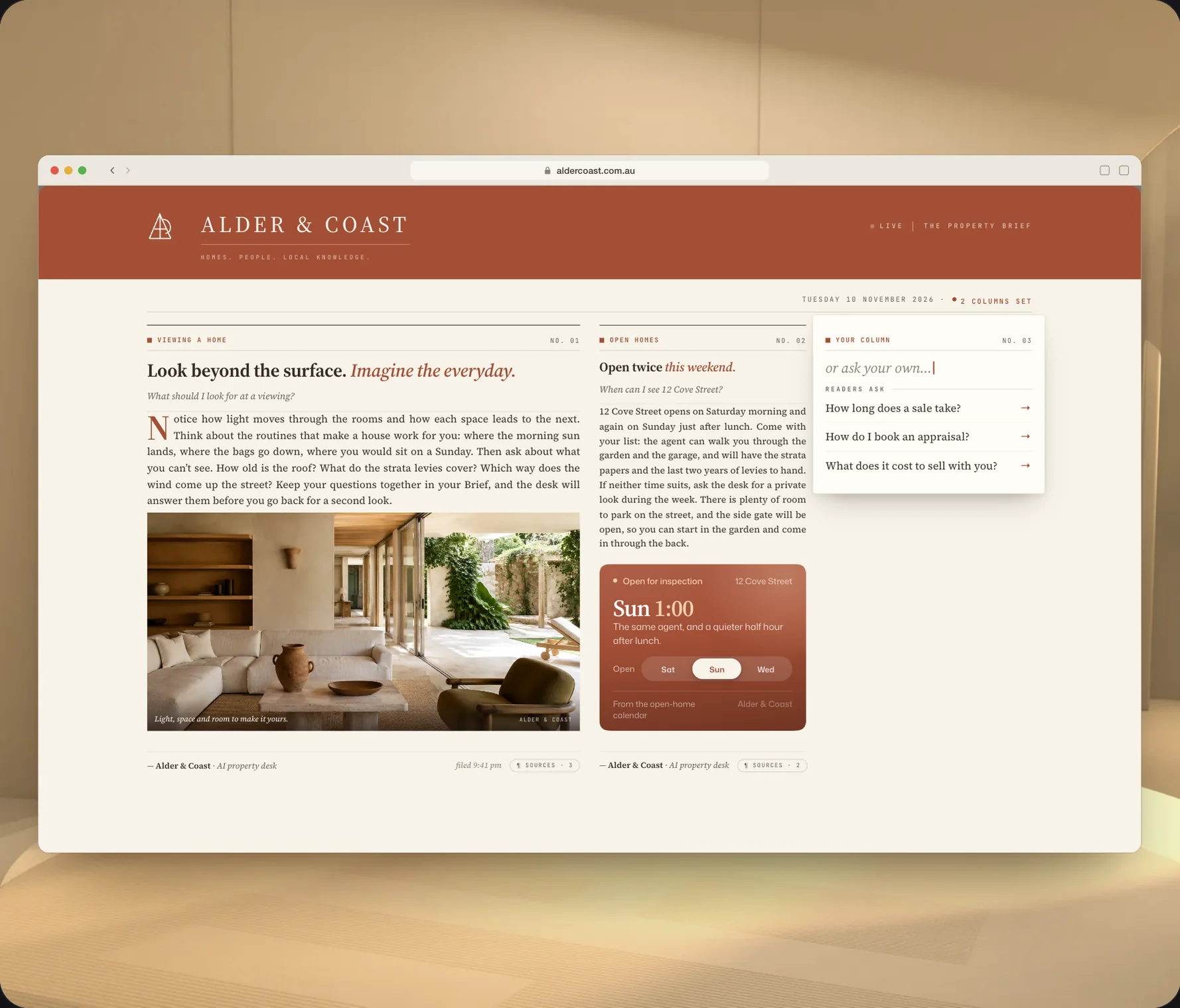
It knows what your business knows
A chatbot knows the pages you load into it. A Brief starts there, then finds what is missing: the questions your customers ask that your website can’t answer. You answer those once, and from then on your Brief knows them.
A Brief compared with Intercom Fin
Intercom Fin answers in a chat thread inside a helpdesk and charges US$0.99 for each conversation it resolves. A Brief answers with pages in your own brand on your own website and costs a flat A$390 a month, however many customers ask. Fin suits a support team; a Brief suits a business whose customers ask before they buy.
It leaves you better off
Every question also shows you what your website never said, and your answers can become pages that AI search can read. How a Brief gets your answers into AI search.
- Price
- A$390 a month
- To build and set it up
- A$500, once
- Charged per question
- Never
- Contract
- Month to month
- Live in
- About a fortnight
A Brief answers from your documents. It isn’t a helpdesk: there is no shared inbox or ticketing, and it doesn’t look up a customer’s order or account. A Brief and a chatbot, side by side.
06Six questions that decide it
- What should your customer see?
A chat thread suits a support conversation. A page suits someone deciding whether to buy, book or enrol, who wants the answer, the picture and the next step together.
- What will it know?
Every route answers from your content. Ask what happens to the questions your content can’t answer, because those are the ones that cost you customers.
- Who will keep it accurate?
Someone has to notice when a price, a date or a policy changes. Decide who before you choose.
- How do you want to pay?
Per-resolution pricing is cheap when it’s quiet and unpredictable when it’s busy. A flat fee is the reverse.
- What happens when it doesn’t know?
Ask each vendor to show you. The good answer is that it says so and hands the question to a person, with the context attached.
- Where is the data kept?
Your documents and your customers’ questions are stored somewhere. Ask where, and whether they are used to train AI models. A Brief’s data is stored in Australia, answers are composed by AI providers in the United States, and nothing is used for training.
07Getting it onto your site
Nearly every route goes onto your site the same way: one line of code, a script tag.
- Copy the script tag your vendor gives you
It is a single line that begins
<script. - Open your site’s code settings
On most platforms this is called custom code, code injection or the theme editor.
- Paste it before the closing body tag
Site-wide, so it loads on every page. Google Tag Manager works too.
- Publish, then open your site in a private window
Check it appears on a phone as well as a desktop.
- Ask it something your website doesn’t say
How it handles that question tells you most of what you need to know.
| Platform | Adding a script tag |
|---|---|
| WordPress (self-hosted) | Yes. An administrator can add scripts directly or with a plugin. |
| WordPress.com | On a paid plan with plugins and hosting features switched on. |
| Squarespace | With code injection, on the Core, Plus and Advanced plans. |
| Wix | With custom code, once the site is published on a connected domain. |
| Webflow | With custom code, on a paid workspace or site plan. |
| Shopify | Through the theme’s code editor, or an app embed. |
08About Briefs, briefly
What is a Brief?
A Brief is your business’s own AI, on your own website: it knows what your business knows, and answers every customer with a page in your brand.
A customer asks anything. The answer arrives as a page: a headline, a few sentences, one of your photographs and, where it helps, a widget such as a price guide, a timeline or the steps to book. It is written on the spot, from your own website and documents.
How do I put AI on my website with Briefs?
Send us your web address. Your Brief is built from what you already publish, you fill in what your website leaves out, and you approve it before it goes live.
It goes onto your site with one line of code, which works on WordPress, Squarespace, Webflow, Wix, Shopify or a custom build. Most Briefs are live in about a fortnight.
Which website platforms does it work with?
Any site that takes a script tag, which includes self-hosted WordPress, WordPress.com on a paid plan, Squarespace plans with code injection, Wix, Webflow and Shopify. It can also be added through Google Tag Manager. Platform notes are in the guide.
What does it cost?
A$390 a month, plus A$500 once to build and set it up. There is no charge per question, and the contract is month to month.
Does a Brief help us show up in ChatGPT and AI search?
It can. AI search can only cite what is written down, and the facts customers want most are often known only to you. A Brief finds those gaps from real questions. When you answer one, the answer can be published as a page on your own website, where ChatGPT, Claude and Google can read it.
It is part of every Brief. How it works.